Application Utilisation Reports

Description - The ability to see application usage data within Nerdio for the host pool applications

Problem - In the days of SCCM it was possible to get utilisation reports on how often apps are used, helping to reduce licensing costs and image bloat. With the AVD there doesn't seem to be anything like this available. This would be useful in assisting customers on whether certain apps are required as part of their deployments of whether they're adding unnecessary bloat

Vision - a dashboard within Nerdio showing usage data by app/user/host pool showing launch counts etc

4

Comments (10 comments)

1
Avatar
George Zajakovski

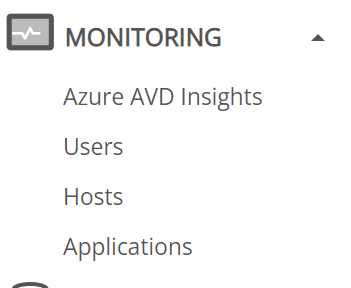
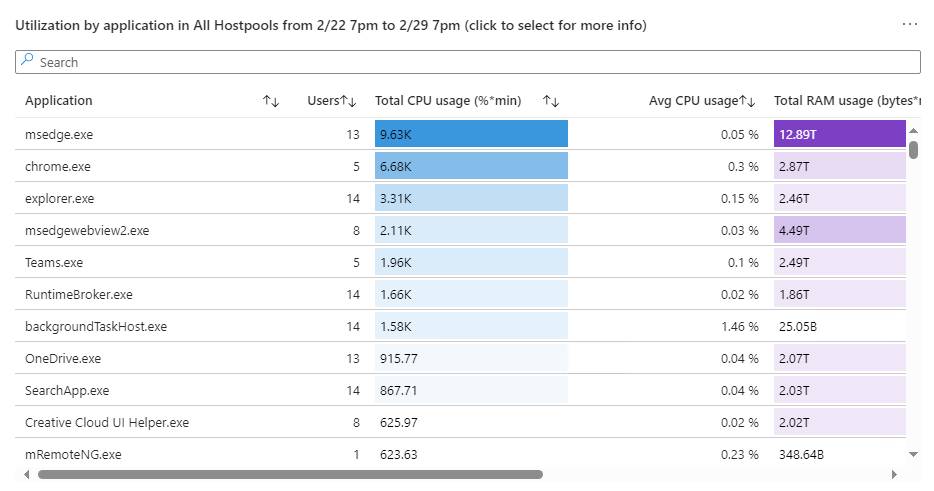
Hey Alex, this might help Monitoring > Applications.
Not the best looking for a 'Report' but gets the job done. 

0
Avatar
Alex Marsh

I'm struggling to find that, where is it exactly?

0
Avatar
Toby Skerritt
(Edited )

hi Alex Marsh - if you have Sepago integration enabled, this will be under the monitoring blade. Also thank you for your suggestion to incorporate application license and performance monitoring into the product, we have captured this request. 

0
Avatar
Elizabeth Webb

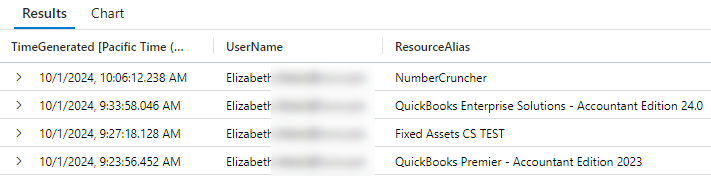
I whole heartedly second this request.  We don't have Sepago, and while we are able to get some of that info (very not pretty) in Azure using Kusto Queries on the logs, it would be a huge help to have it on a dashboard in Nerdio. Additionally, while the Sepago utilization may show the application, in cases like QuickBooks where the .exe is the same for all versions, we really need to see it split out by specific version, as shown below.  Having the usernames is also a huge help, in case we have questions about the utilization, and need to reach out.    Thanks for considering this feature request!


0
Avatar
Toby Skerritt
(Edited )

Hi Elizabeth Webb, thank you for sharing this additional information. Regarding the Kusto query you use, is it giving you all the information you require, or only partial information?

Could you please share the query you use with any sensitive info anonymized for our reference? We would love to provide greater visibility into the VM and application usage, and we are reviewing the different options available to us to capture this. Thank again!

0
Avatar
Elizabeth Webb

Sure!  My initial very basic query was:

WVDConnections
| project TimeGenerated, UserName, ResourceAlias
| where TimeGenerated >= now(-30d)
| where ResourceAlias != "SessionDesktop"
| where ResourceAlias != "<>"
//| where State == "Completed"
//If you only want to see one application, un-rem this line:
//| where ResourceAlias contains "QuickBooks"
//If you want to look at a specific user, un-rem this line:
//| where UserName == "<<enter UPN here>>"
| sort by TimeGenerated desc

Line 4 & 5 filter out connections made to assigned desktops.  I was using Line 6 (rem’d out at the moment) to limit multiple lines returned for the same session, but not every connection seems to log as “Completed”.  Some have Started/Connected/Completed, some only have Started/Connected, or Started/Completed, and I haven’t been able to determine why that occurs.  

However, the biggest limitation I found with this first script is that it does not display ALL apps launched.  We have multiple applications on each session host, and in my initial testing it would only log the FIRST application launched, so I thought perhaps it was only logging session initiations. For example, if I opened App B, App F and then App D, only App B would show in the connection logs.  If I fully signed out of my session and then launched App F, it would show in the logs, because that was the start of a new session.  Likewise, if I opened App Q in a different host pool (and thus created a different session), it would display that as well. More recent testing though has been less consistent - while it still does not show all apps launched, it does show more than just the first app; again, I haven't been able to determine the logic as of yet.  

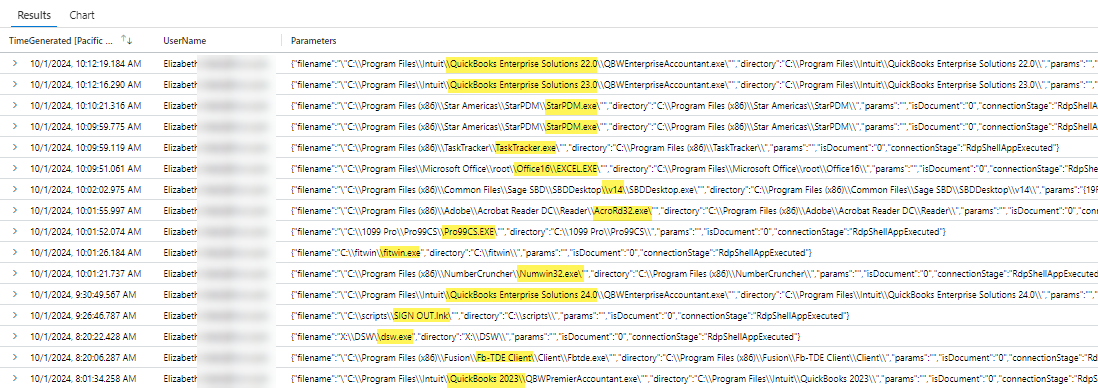
A second script I've been working on bypasses that limitation and shows all application connections (and only app connections, not desktops), but it displays the application path only.  A) It's not 'pretty', and B) while some apps are easily ID'd by their path, a few are a little more obscure, and require knowledge of the path to ID the app.  However, I would think it'd be easy enough to code in 'translation' of the path to the name, since both are contained in fields in the Azure Application object 

WVDCheckpoints
| where TimeGenerated >= now(-30d)
//| where UserName == "<<enter UPN here>>"
| where Name == "RdpShellAppExecuted"
| where Parameters != "{}"
| project TimeGenerated, Name, UserName, Parameters

So I am able to get the information I need, but it’s not neat and easy yet, and my bosses would love to be able to see it on the Dashboard, or in Insights.  My next steps are to see if I can schedule the script to run routinely and output (amend) to a running log, so we can see continuous historical use, versus the 30 days limited by Azure.  I know we can export the logs to a new Log Analytics workspace to allow archiving for longer periods, but then to query it, you have to go in and mount the archive before you can search, so it’s a bit of a headache to go that route.

Here are the script outputs for today, filtered just to my account so you can see what I mean about not all apps captured in the first script: 

1st Script Output: 

2nd Script Output:

Thanks for looking into this, Toby!

0
Avatar
Elizabeth Webb

*Sheepish admission: just found the table definition for the State parameter referenced in the 1st script, so my filter really should have been on "Started" vs. "Completed".  But the script still doesn't show all the apps, so probably a moot point. 
https://learn.microsoft.com/en-us/azure/azure-monitor/reference/tables/wvdconnections

0
Avatar
Toby Skerritt
(Edited )

hi Elizabeth Webb - Thank you so much for taking the time to test and document this. We will take these comments bac to the development team for review. 

The 'first running app' issue you mention is one we have experienced before, and still restricts our ability to display all running Remote Apps on the sessions page. We use WVDConnections/ResourceAlias to return this value, but again this will only return the first app launched for Remote App sessions in out testing (and this only returns 'SessionDesktop' for any full desktop sessions, which isn't very helpful!). WVDCheckpoints/RDPShellAppExecuted seems to give much better results, including the path to the .exe, which seems to meet with your request. One issue however is that it doesn't return a friendly name, so we need to make do with just [Name].exe or [full\path\to].exe. Does this information offer enough value for you?

You mentioned long term storage and assessment (beyond 30 days). I would have expected this feature to be more valuable to live troubleshooting activities, please can you help me to understand the value of long-term retention and review of these details? Is the objective similar to the original request in this thread?

Thanks again!

0
Avatar
Elizabeth Webb

Hi Toby Skerritt!

So, yes, we could make do using the file path name, but the path name and friendly names are both in the application properties, and I was able to use the following PowerShell command (in the Az.DesktopVirtualization module) to pull friendly name and file path together.  In theory, a recursive PowerShell script could pull all the names and paths in all the AVD Resource Groups to allow a lookup on the path to pull the friendly name, but I'm not that advanced in my coding yet (and haven't asked CodeGPT yet!), so can't verify.  

Get-AzWvdApplication -ResourceGroupName "<<resource group name>>" -GroupName "<<application group name>>" | Select filepath, friendlyname

Example Result: 

As for the long term storage, we have a number of 'optional' software packages published that only a small subsection of users make use of, and they are very bad at telling us when they no longer need the software.  So, if we had a history of six months or so, and could see no instances of a given application being launched, we could go back to that group of users and say, "Hey, no one has launched XYZ app in the past 6 months, do you still require access?", and this would help us to remove unused applications (or even just users who no longer required access), and in some cases recoup licensing costs as well. 

I really appreciate your team looking into this!

0
Avatar
Toby Skerritt

Elizabeth Webb - very interesting, thank you for sharing these details. The usage trending requirement also makes sense. I will capture these discussions in our backlog and discuss with our team. Have a great weekend! 

Please sign in to leave a comment.