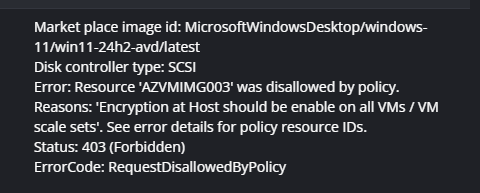
Add option to enable encryption at host for Desktop Images

When creating a desktop image via Nerdio, add an option to enable encryption at host.

https://learn.microsoft.com/en-us/azure/virtual-machines/disk-encryption#encryption-at-host---end-to-end-encryption-for-your-vm-data

Given our strict Azure Policies, we are unable to create/modify out desktop images due to a requirement for Encryption at host. In the meantime, we are working around this via a temporary exclusion to the Azure Policy.

6

Comments (4 comments)

2
Avatar
Chad Manzer

Can you confirm that on the host pool properties under VM Deployment you have enabled the "Enable encryption at host" option and the VMs deployed in the host pool meets your Azure Policy needs? 

I will record this, as it seems like a miss not having the option to enable Encryption at host for the VM used for the desktop image creation. 

Thanks, 

thank you. 

0
Avatar
Brad Hemsley

Chad Manzer I can confirm the hostpool has encryption at host enabled, so session hosts builds are good to go.

If we want to perform maintenance on the desktop images, this is where (existing hosts that have encryption disabled) get hit with our Azure Policy.

As a stop-gap, we are looking to manually enable this option on the desktop image vm's

Cheers,

Brad

0
Avatar
Timothy Cochran

It seems that you would need to decrypt the host machine before capturing it as an image for provisioning. This could be quite cumbersome and time-consuming, making the process a bit of a nightmare. Not sure if even Nerdio is considering the capture image as being encrypted, if it made it past capture it might fail when deployed to the host machine. Given this, I believe that maintaining an exclusion for your resource group that would only contain your master images. This would be the most practical solution.

0
Avatar
Lars Bertulies

Upvoted because we are in the same boat:

We are currently working around via an exclusion but would prefer if we could just enable encrpytion at host for images via Nerdio. Please also make sure that temp VMs used during image creation tasks inherit the setting from the parent VM.


Timothy Cochran Encryption at host manages disk encryption transparently, as long as you use platform managed keys - even the offical gallery images are encrypted this way. See https://learn.microsoft.com/en-us/azure/virtual-machines/image-version-encryption

Please sign in to leave a comment.