GPU Driver Issues (Boot Loop)

Recently in Support, we've seen a lot of reports of GPU Driver issues, in most cases causing AVD hosts to get stuck in a boot loop. While this issue has been identified to be an issue with the GPU Driver, specifically an AMD GPU Driver, there isn't much out there in terms of acknowledgement of the issue nor many fixes/workarounds. 

As such, we thought we'd put together this Community post to give customers/partners at least some of the information we've been able to gather.

Please see the following useful Reddit post, in which a Nerdio user has done some thorough testing and helped provide some answers and a workaround: Anyone else having issues with MS GPU drivers / GPU Machine types on 10/30 and after? : r/AzureVirtualDesktop

An option as a workaround would be to disable 'Install GPU drivers on supported VM sizes' in Host Pool Properties > VM Deployment, then to install the driver on your image (if using custom images).
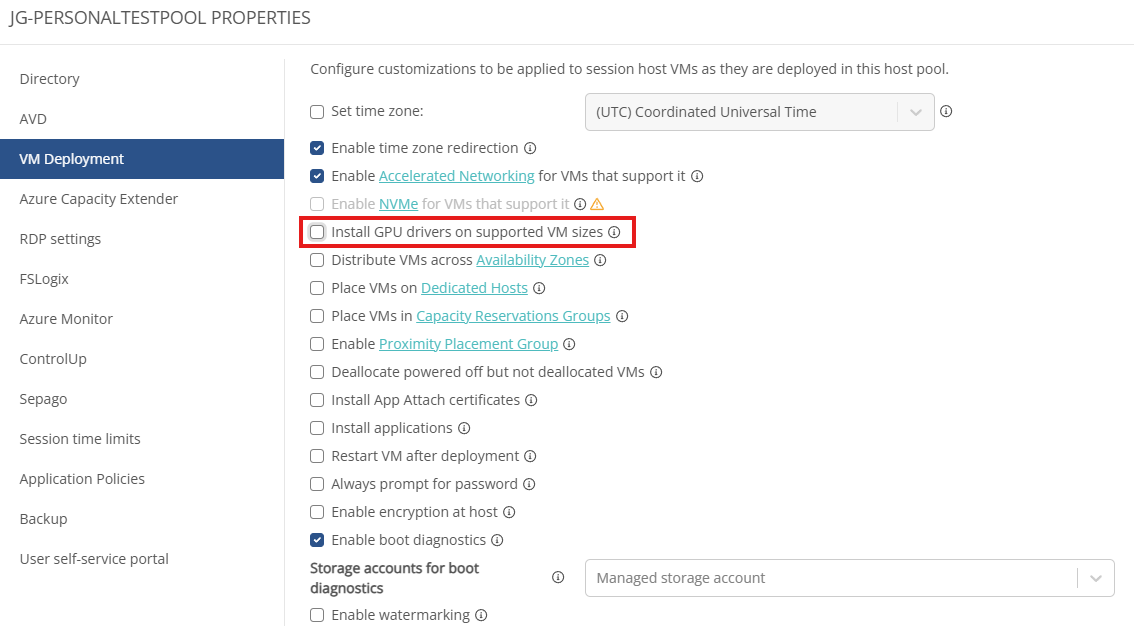
 

Other workarounds include replacing AMD GPU-enabled hosts with Nvidia GPU-enabled hosts, however, understandably this is a bit more time-consuming and may not be a suitable solution in all cases. 

We'd strongly recommend anyone facing this issue to raise a ticket with Microsoft Support 

1

Comments (1 comment)

0
Avatar
Craig Baxter

Hi Josh, I have had a support call open with Microsoft for a few weeks now about this issue. On one of the emails I was told that the fix was waiting for the expert who was OOF and will only return in a few days. I then got a reply from them a few weeks later to say that Microsoft was in a deployment freeze because of elections and thanksgiving. Pretty depressing that the whole world has to stop because something is going on in America as this is affecting 8 different Azure regions we use. Below is the latest possible workaround they have supplied which may help you. We are also testing out a scripted action as a workaround. 

Possible work arounds:


  1. If you are using ARM templates for your deployments, you can pass a runtime setting which can disable the reboot triggered by the extension. 
    1. for v1.5:
      1. {
      1.   "name": "AmdGpuDriverWindows",
      1.   "type": "extensions",
      1.   "apiVersion": "2015-06-15",
      1.   "location": "<location>",
      1.   "dependsOn": [
      1.     "[concat('Microsoft.Compute/virtualMachines/', <myVM>)]"
      1.   ],
      1.   "properties": {
      1.     "publisher": "Microsoft.HpcCompute",
      1.     "type": "AmdGpuDriverWindows",
      1.     "typeHandlerVersion": "1.5",
      1.     "autoUpgradeMinorVersion": true,
      1.     "settings": {
      1.          "rebootAllowed": false
      1.     }
      1.   }
      1. }
    1. for forcing the extension to install an older version, say (v1.4 - Installs 22Q2)
      1. {
      1.   "name": "AmdGpuDriverWindows",
      1.   "type": "extensions",
      1.   "apiVersion": "2015-06-15",
      1.   "location": "<location>",
      1.   "dependsOn": [
      1.     "[concat('Microsoft.Compute/virtualMachines/', <myVM>)]"
      1.   ],
      1.   "properties": {
      1.     "publisher": "Microsoft.HpcCompute",
      1.     "type": "AmdGpuDriverWindows",
      1.     "typeHandlerVersion": "1.4",
      1.     "autoUpgradeMinorVersion": false,
      1.     "settings": {
      1.     }
      1.   }
      1. }
      1.  
      1.  
  1. You could also disable the reboot triggered by the extension using Azure CLI
    1. For installing v1.5:
      1. az vm extension set  --resource-group <rg-name> --vm-name <vm-name> --name AmdGpuDriverWindows --publisher Microsoft.HpcCompute --settings "{'rebootAllowed': False}"
      1.  
    1. By default we install the latest extension but we can force to install the older versions of extension. For installing v1.4:
      1. az vm extension set  --resource-group <rg-name> --vm-name <vm-name>  --name AmdGpuDriverWindows --publisher Microsoft.HpcCompute  --version 1.4 --no-auto-upgrade-minor-version true
      1.  
  1. If you have multiple VMs on which you need to apply the fix you could use the below script to do so. 

            # no need to install on cloudshell

                        sudo apt install -y parallel


                     # this will echo 3 times the azure-cli command. remove the echo command to run the actual command

                                parallel -I% echo az vm extension set  --resource-group resource1 --vm-name % --name AmdGpuDriverWindows --publisher Microsoft.HpcCompute --settings "{'rebootAllowed': False}" ::: vm00                                    vm01 vm02

Please sign in to leave a comment.