
We need a way to configure the Azure Capacity Extender tab in bulk for many pools at once. A concept similar to profiles can be used. This feature is also not available in api as well. This is very important especially when dealing with hundreds of pools.
Azure Capacity Extender profiles (Planned)
6

This will be a great feature to have.

Hi Florian and DJ!
Both of these features are on our roadmap for Q3/Q4 this year, with a few initial similar additions within Q2. We see immense value in adding profiles for various host pool properties to allow bulk changes, and we are also investigating adding APIs for these.

Would love to see both Capacity Extender profiles and App masking profiles added to Nerdio. When we are fininshed building out Prod we will have over 200 host pools. Being able to apply profiles to multiple host pools at once is crucial for saving time!

Hoping to see this come through. In addition, It would be nice for Nerdio to track SKU drift caused by ACE and offer a way to correct them. Currently this has to be done manually, and it can be a pain coordinating the change around user sessions
Hi everyone, regarding Azure Capacity Extender profiles.
Would implementing a profile that only has the Intelligent Azure Capacity Extender option enabled with the configured settings suffice?
The scenario we will cover using this method is that you will be able to set manageable restrictions for all host pools to which this specific profile is assigned.
You may already be aware that specific VM SKU sizes have different capabilities and support different technologies.
By using a profile with your custom, configured, manageable restriction parameters, you can utilize this profile across multiple host pools, and it will only use VM SKUs with the same supported functionalities as the default VM SKU used for that specific host pool.
This will avoid issues where host pools may have different sets of alternate VM SKUs selected for Azure Capacity Extender, which may not be supported for host pools with conflicting configurations enabled and different default VM SKUs.
Please let me know your thoughts.

I can't say I've used the Intelligent Agent before. We are building out a large production environment over the next several weeks/months but I don't think it would be an issue to use it. We haven't done our capacity testing yet to know for sure what sku we are going with but we are working with micorosoft on that as well as alternate skus for the environment. Honestly will just be glad to have a way to make changes at scale whichever route you all build out.
Yes Raul, that would be great to have as a start. Hopefully we can see the full functionality that enables us to manually select SKUs soon.
Hi Florian,
Is there a particular reason why you need to select SKUs manually rather than using an automated process to ensure that only compatible VM SKUs are chosen?
If the profile allows the selection of VM SKUs and is then applied to different host pools with incompatible configurations, it may cause drift and incompatibility issues and require manual effort.
Hi Raul. What you say makes sense. I was thinking about the functionality that exists today where we can manually select SKUs and having a profile with the same options. Why is that an option today where we can manually select SKUs if it can introduce issues? But again, having the profile with just the intelligent extender would be great too, the only thing I wanted to make sure is that it should show the compatible alternative SKUs. Thank you again for staying on top of this.
Hi Florian, Azure Capacity Extender is not currently used with profiles, so it would not cause issues across different host pools, as it's not currently scalable.
Today, when choosing alternative VM SKUs for a specific host pool, warnings and disclaimers are displayed if you select incompatible VM SKUs.
Hi Raul. Right, I agree, but also the admin is responsible to apply the right profile to the right pools. These pools should all be of the same flavor, with the same configs or very similar etc. When we create a profile we will do it having a use case in mind. For example, I have 100 pools that are the same. When I create a profile for them I need a way to select the default sku, which can also be pulled from the autoscale configs of one of the pools. Then the alternative skus can be configured manually or using the intelligent feature. I am ok if only the intelligent feature is used if that filters out the bad skus for us and shows us the good ones. However there are some things to consider with the intelligent feature. I see it only shows up to 3 skus, it would be good to show more and maybe we can select which ones to use. Also whe we configure the restrictions under it, I see it has options like +/- 100% (of RAM or cores); that is great but paired with the fact above where it shows only 3 skus, it ends up showing skus with 2 cores when the default size is 8 cores. I think some more options need to be added there where we can select only +100% for example instead of +/-100% Then we should be able to apply this profile to multiple pools. It is our responsibility to now apply this profile to the right pools. We can create different profiles for different flavors of pools.
Hi, Florian.
We can certainly look into expanding the number of SKUs beyond just three.
Regarding +100% parameters, that is supported via these options:
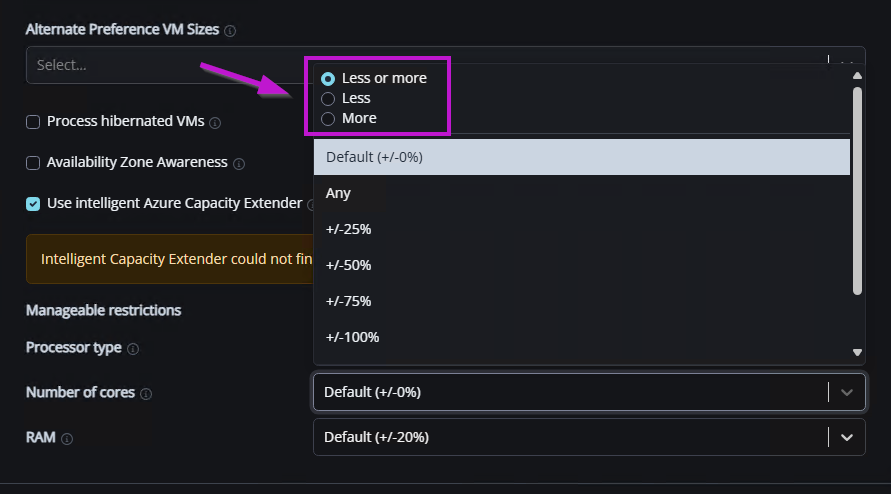
Regarding the removal of specific VM SKU sizes, the idea behind using intelligent Azure Capacity Extender is to eliminate manual effort in managing different VM SKU sizes within a profile, allowing seamless scaling of the profile across various host pools.
However, I also understand your reasoning for having more granular control and leaving these parameters to the customer.
Thank you for all the feedback!
Oh thank you for that tip, I had missed the top part there. No, I agree, the intelligent feature can be used to automatically select only the good SKUs. It is a little difficult to visualize how it will work, but will we be able to see and know the selected good alternative SKUs right when we are creating the profile before we apply it to the pools, or will we have to create a general profile, apply it to the pools and then go to the pool settings to see what alternative SKUs it selected based on the default SKU?
Hi Florian, the latter method will be the most likely path.
Once the profile is applied to another host pool, you can open the host pool settings to review the alternate SKUs in use for that specific host pool.
Ok, that means a little bit more back and forth between the profile configuration page and the pool to check what alternative SKUs it selected. How about you adding a field in the profile config page where we can select a base SKU to simulate what alternative SKUs are selected so we don't need to go back and forth? The idea is that we need to know the alternative SKUs because we are going to ask for quota increase for those SKUs.
Please sign in to leave a comment.
Comments (15 comments)