Auto-Scale Profile Overrides on Host Pools via REST API (Completed)

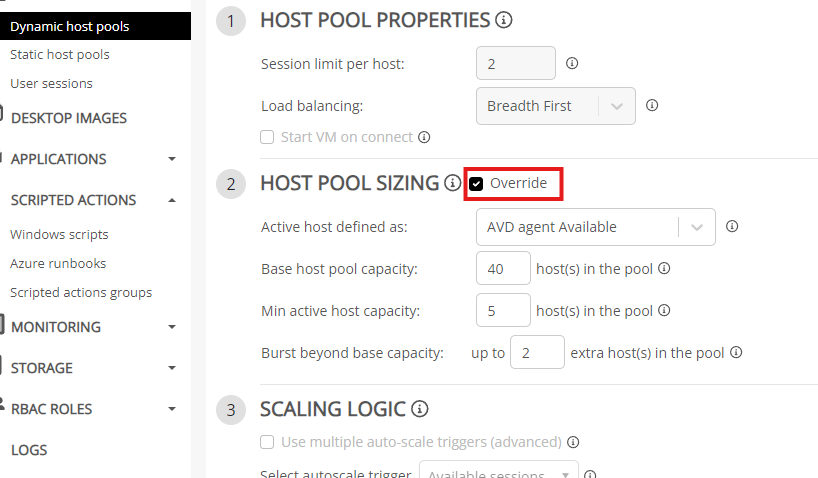
When assigning an Auto-Scale profile to a host pool, the Nerdio UI offers the ability to override certain values as needed via a checkbox. This is what mainly makes Auto-Scale Profiles reusable across many host pools. However, this functionality is not available via the REST API. Our team would like to be able to automate around this.

Existing UI Functionality:
 

Host pool REST endpoint which does not support this:

0

Comments (3 comments)

0
Avatar
Raul Morales

Hi John,
Thank you for your submission. We appreciate your feedback. 
We would like to understand your use case better for allowing overrides via API.
Would creating separate auto-scale profiles that fit the necessary configurations and are then assigned via API be feasible?
If this is not ideal, could you provide further details on why allowing auto-scale overrides via API is beneficial in your use case?

0
Avatar
John Rocha

Creating a separate auto-scale profile for each host pool is a solution that technically works, yes...

However, it is not as feasible for large amounts of host pools that share the same exact configuration minus one or two differences. For example, we have a service that we deploy across many regions. It always has the same scaling logic, pre-staging, auto-heal, etc., with the only difference being that each region should have different host pool capacities based on our user count in that region. Maintaining 10 different regions now requires 10 different auto-scale profiles instead of a single shared one with overrides for that one property. Moreover, code changes then also have to be made in 10 places instead of 1 if we ever wish to update the scaling logic or pre-staging settings for said service just to make sure it is synced across our many duplicated profiles. 

0
Avatar
Raul Morales

Hi John, thank you for the additional insight. I understand your use case and we will investigate the feasibility of adding this to our roadmap. Thank you.

Please sign in to leave a comment.