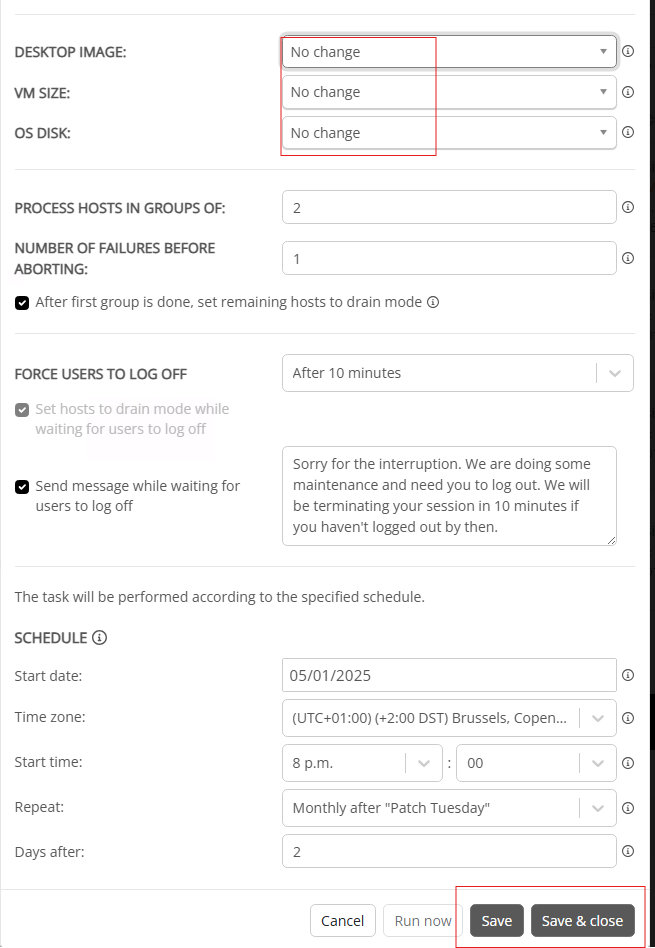
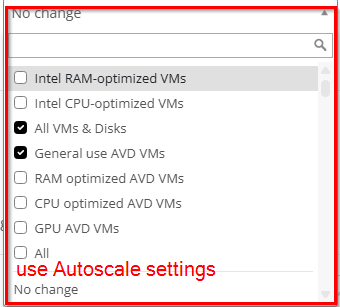
re-image - use Autoscale settings

We are using re-image host on monthly basis, to use latest image to refresh session hosts

Currently when configuring host pool to configure Desktop Image, VM size, and OS disk I need to configure Autoscale Settings.

When doing re-image host pool, the settings I need to configure again.

When deciding to change host pool setting I need to configure the settings two times.(Autoscale and Re-Image schedule)

In re-image options (Image, Disk, VM size) I am missing option “use Autoscale settings”
3

Comments (6 comments)

0
Avatar
Marek Sokół

Alternatively it would be just enough to be able to use “no change” settings and save/run. Unfortunatelly if “no change” is set, it is not possible to save/run task as save/run buttons are made inactive.

0
Avatar
Raul Morales

Hi Marek Sokół, would allowing the ability to save without making changes to initiate the re-image fulfill your goal?

Thank you!

0
Avatar
Marek Sokół

Hi Raul Morales , not sure but I do not think so. The issue on image is “Run now” is greyed out when Desktop Image “not change used”. The goal here is to make possible to set Image only once (in Autoscale configuration), and in re-image wizzard only to trigger re-image process.

As now it is possible to set different image in Autoscale and diferent in re-image wizzard, and this in most cases would be simple human error (having deferent image selected in both options) rather advantage.

Best regards

Marek

0
Avatar
Raul Morales
(Edited )

Hi Marek Sokół  - I believe I understand. There are two functions that we would like to achieve:

1. Allow the retrieval of the Auto-scale configuration in the re-image wizard to avoid human error / wrong configuration selection.

2. Allow to “Run now/Save” even if no changes occur to initiate a re-image.

Please let me know your thoughts.

0
Avatar
Marek Sokół

Hi Raul Morales 

Yes, exactly.

0
Avatar
Raul Morales

Thanks for confirming! We will investigate for a future release.

Please sign in to leave a comment.