
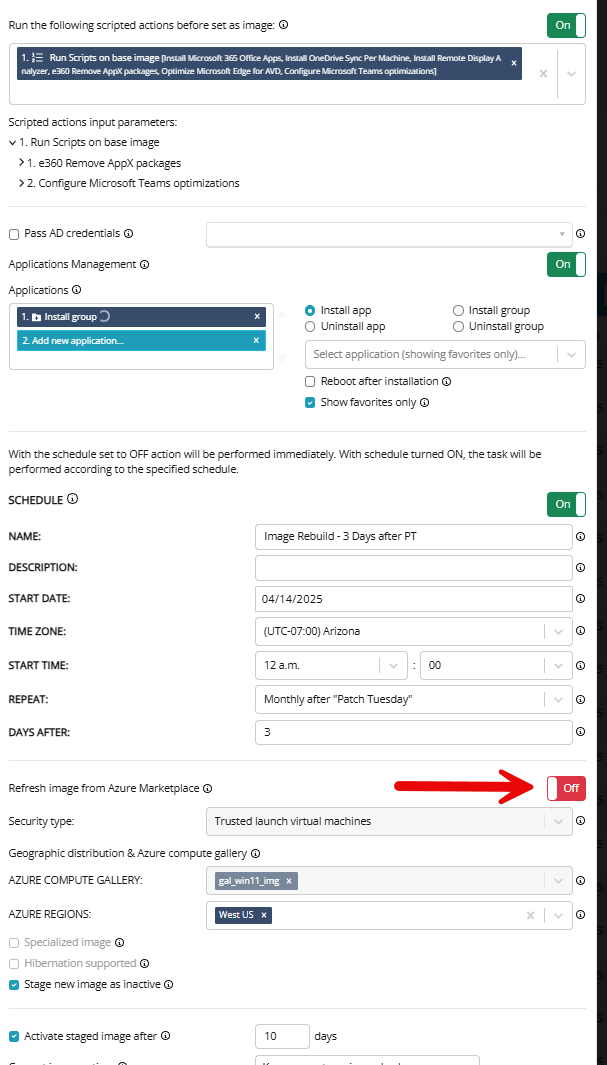
I am scheduling a rebuild of a master image each month and will have it install the applications and scripts during the Set As Image process so they are installed on the clone. I also want to use the option “Refresh image from Azure Marketplace” in the schedule to bring down a new OS each month. After I save this schedule the option to Refresh image from Azure Marketplace is not saved but all other settings are. Is this expected behavior?
Refresh image from Azure Marketplace
0

Hi Brian
I proceed in the same way when creating an image. There is currently at least one feature request that asks for the process to be optimized.
If you don't want to change the settings every month, I recommend creating a schedule. Monthly, if you always want to create the image at the same time anyway, or with a date as far in the future as possible. In both cases, the settings are saved in the scheduled task.
I hope this helps.
Regards
Stefan
I always want to create the image in the same way, but they option to refresh from the Azure Market Place does is not retained. When I look at the schedule after saving it, it is turned off
Ok, thanks for the additional details. From memory (holiday, am not at the computer) I would say that this is exactly how it works, or worked, for us in several instances. I would have to reproduce it briefly in the lab. Do you have any information about your Nerdio version, are you already on 7.0? Has this ever worked before?
I am on version 7.01. I did not try it while I was on the latest 6.x
Well, I can only confirm that it must be a bug! With my existing image, which had saved the settings, the information about the image disappeared after loading was complete. With version 6.7.2 (customer environment) everything is fine. I can also add that if the Scheduled Task had an image configured, after reopening it (first time to see that image is really no longer selected) the setting "Refresh image from Azure Marketplace" is disabled. After F5 it is again as before, simply no image selected.
Are you creating a ticket with Nerdio Product Support ? You can refer to this thread, at least one more confirmation!
Please sign in to leave a comment.
Comments (5 comments)