Grey out Activate / Deactivate (Completed)

When clicking the three (3) dots that opens the menu of actions to take for a host, the Deactivate and Activate are both available. If a host is already Activated, you'd expect it not to be clickable- greyed out like Send Message is.  

If the host is Deactivated, you'd expect the Activate to be clickable and the Deactivate not be clickable, thus greyed out like Send Message.
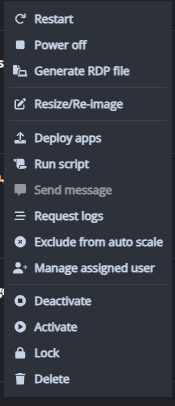
Unless I'm misunderstanding what these Actions actually mean/do to the host?

0

Comments (6 comments)

0
Avatar
Carsten Marquardt

Hi Nick,
I think the menu doesn't consider the current status of the VM, because the popup that follows allows you to either execute the selected action immediately or configure a scheduled run. If the menu item weren't clickable, you wouldn't be able to configure a new schedule.
I hope this helps.

1
Avatar
Raul Morales

Hi Nick and Carsten, I would also like to add that the “Activate/Deactivate" actions refer to Drain mode. Drain mode can also be executed on Shutdown/Deallocated VMs.

0
Avatar
Carl Long
We appreciate your feature request—community input is essential to our ongoing development.

Next steps:
     • We will review your suggestion and update its status during the evaluation process.
     • If further clarification is needed, we'll contact you via comments.

We also encourage others to contribute through feedback and voting.
1
Avatar
Paul Ofoche

Just an observation - the Activate and Deactivate options also give you the ability to schedule activation and deactivation, therefore they could be utilised regardless of the state of the selected machine.

1
Avatar
Raul Morales

Hi Paul, you're absolutely correct; this was Carsten's same observation above.

0
Avatar
Nick Bogdanoff

Thank you for the attention – shows how often I use this feature :)


Post is closed for comments.