
Add option to enable version limit for all Desktop Images before they're captured
Problem:
If I create a new Desktop Image VM and forget to select and configure the “Manage versions” option (after I capture the first versioned image to an Azure Compute Gallery (ACG)) and customize how many backup images I want, I can easily lose or overwrite those images. The “Manage versions” option isn't even available until after a versioned image exists. I commonly run into this while working with Desktop Image VMs within the NME UI, before they're captured to the ACG.
Description:
Let me specify the “Manage versions” options I want ahead of time and let those apply to some or all of the Desktop Images that exist, as well as to all future Desktop Image versions that will ever be created. I establish a standard number of backup versions on client projects and adhere to that, so this option should make sense to folks who are regularly managing Desktop Image versions.
Vision:
Let me configure these options ahead of time instead of waiting until a Desktop Image has versions:
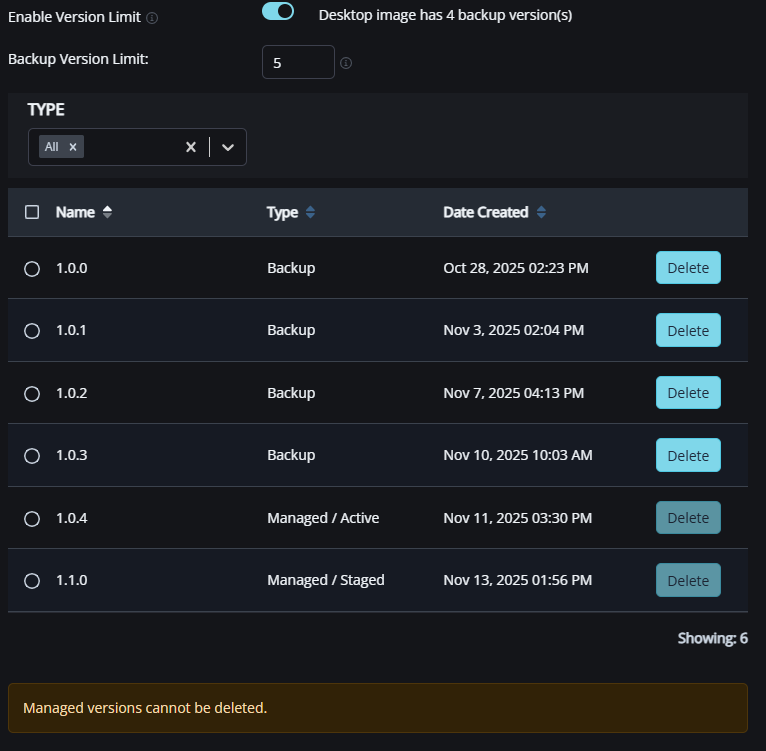
This could be handled as a profile for Desktop Image version management under Profiles Management, or just a configurable setting within the Desktop Images blade within the NME UI.

Comments (1 comment)