
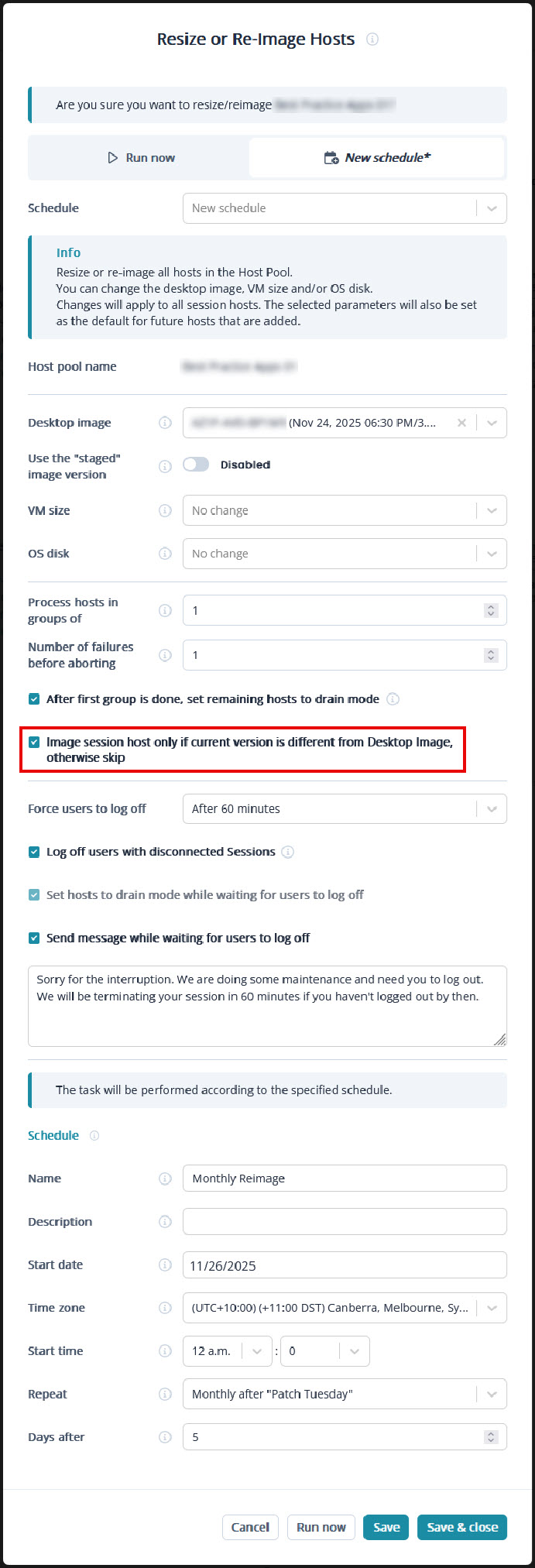
When scheduling the re-image of a Host Pool, especially a recurring schedule, there is no option to skip re-imaging a session host if its current version is already the same as the Desktop Image.
The requirement for such a feature would be in the following example.
Scenario:
We currently have a monthly recurring schedule for a Desktop Image to perform Windows Updates, update some applications, then capture. This generates a new version for this Desktop Image each month (let's say that latest version is version 5).
Example:
- We have another monthly recurring schedule for a Host Pool to re-image with that Desktop Image, a few hours after the capture of the desktop image.
- If the Desktop Image capture fails for any reason, it will not generate a new version number.
- In this case, the host pool would then still end up being re-imaged with version 5 of the desktop image, which is the version that all session hosts were already at. This would be unnecessary re-imaging, costing time and money.
Desired Outcome: The monthly re-image schedule would have an option to be able to compare the version of each session host against latest desktop image version:
- If a session host is the same version, then skip re-imaging it.
I have already taken the liberty of designing this additional option in your Resize or Re-Image Hosts menu. See image.



Comments (6 comments)