
I've already discussed with Wayne Bellows that we are seeing a large number of session host VMs running after hours with only disconnected user sessions. The obvious workaround would be to introduce a second Rolling Drain Mode schedule that switches to Medium aggressiveness after hours, allowing machines with only disconnected sessions to shut down.
However, that approach introduces two significant risks:
- A user working late may momentarily lose connectivity, and before they can reconnect the VM powers down—potentially causing data loss.
- In our environment, Windows Hello for Business (WHfB) is enabled with a 15‑minute idle disconnect requirement. This is necessary to preserve the session token used for SSO. Under this configuration, a user stepping away for a short break would be disconnected automatically and could lose work if the VM shuts down while they are away.
Proposed Solution:
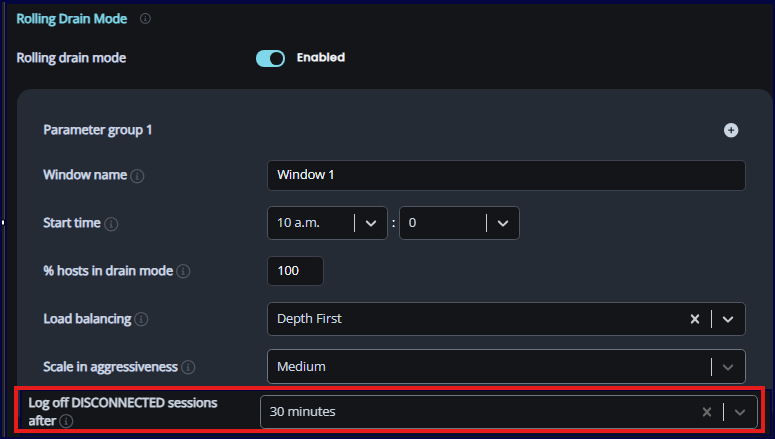
Add a “Log off disconnected session after” option specifically to the Medium aggressiveness mode. This would allow Rolling Drain Mode, during after‑hours periods, to use a more aggressive disconnected-session timeout than what is configured globally.
For example, during business hours our standard “Log off disconnected session after” value is 2 hours, but after hours we could safely reduce this to something like 30 minutes. This gives us finer control and prevents unnecessary VM runtime while avoiding the risks of unintended shutdowns.
I've added the below screenshot and inserted the desired option.
Comments (0 comments)