
We can deploy apps from the Unified Catalog through a one time push and it works great, but with the current configurations it does not allow the user to defer. Would it be possible to add a logic in there that would allow users to defer and attempt later?
App deployment deferral feature
1

Hi Florian Dushniku - Thanks for this request!
Are you envisioning of a popup in-session allowing the user to accept/reject the update at delivery time, or are you thinking of some kind of session preference option (perhaps from the end user portal), where users can define their preferences beforehand?
Many thanks
Toby
Hi Toby, I was thinking of the popup method initially, but actually the best way to do this I think it would be if we target all devices in a pool let's say and the policy pushes it to all VMs that do not have an active session. The VMs can either be stopped or hibernated. It does not touch the active session for now, then as those machines stop or hibernate it starts pushing to them. One thing to be careful here is on the timing it determines if there is an active session or not…let's say we choose to do it 50 machines at a time and we have 2k machines in the pool. It should not scan all 2k machines for active session at once because if a machine does not have a session active when it gets scanned, it might have an active session when its turn comes after several hours.
Ah ok, thanks Florian Dushniku - so we do actually have similar functionality to this already! If you want to create a 1-time or recurrent policy, but you want to ensure app deployments do not happen when a user is connected, you can use the below option to ensure that apps are only deployed if the state matches the requirement. This option only applies to AVD, and the deployment will be reassessed on a rolling basis (<1 hr). Have you tried out this feature? It would be great to hear your thoughts. We added this function for a customer who operates in the critical care space, and needed to ensure that users were not interrupted during app usage.
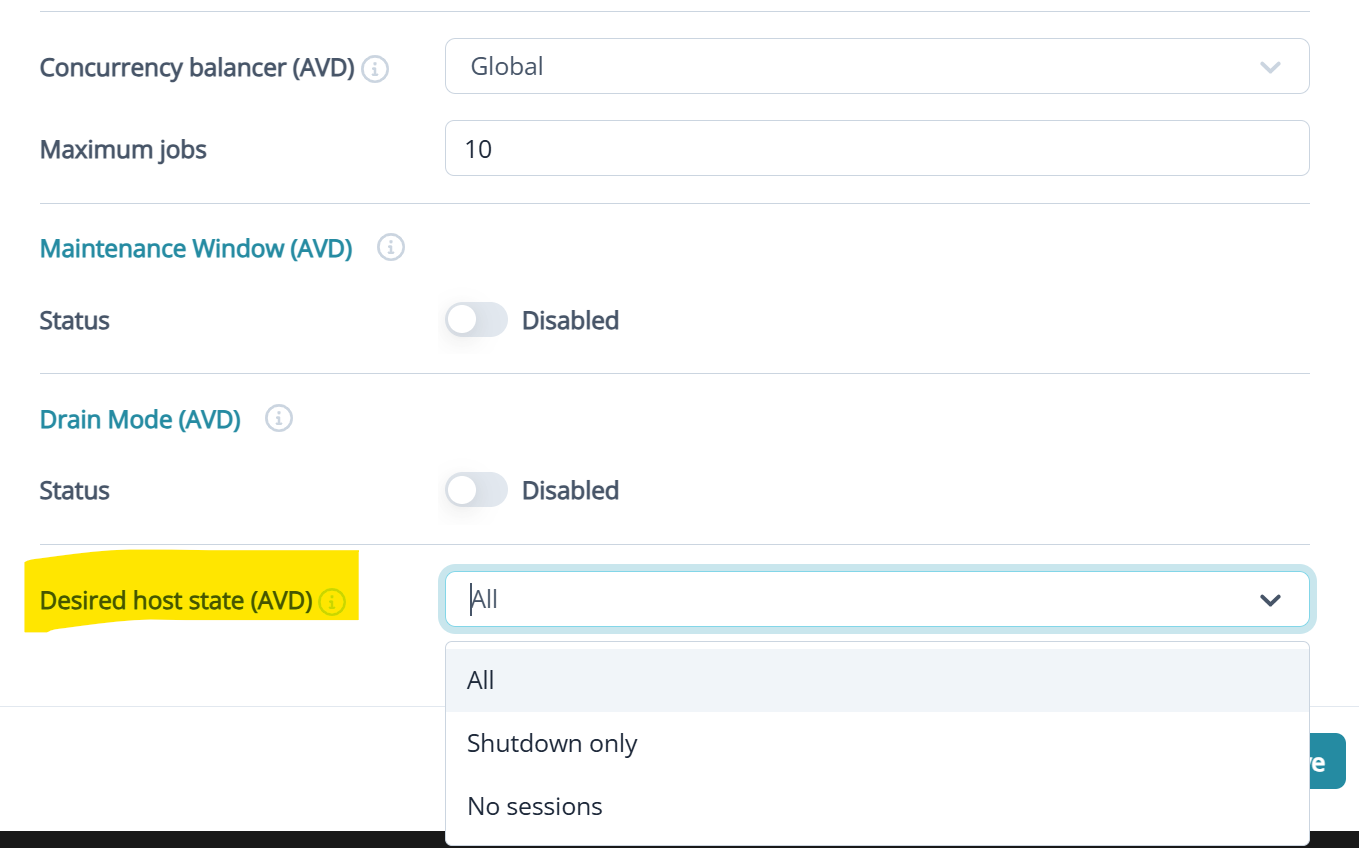
Option details:
Shutdown only - only powered off hosts have the policy applied as part of background task.
No sessions - only hosts with no logged in sessions have the policy applied as part of background task.
Hosts are placed in drain mode at start-up or at task start and returned to original state after maintenance.
Thank you Toby. What happens with hibernated VMs? Those are deallocated but the session in them is disconnected. Does the No Sessions choice include VMs with disconnected sessions too? We would need an option in there like No Active Sessions, so that it applies to all VMs that have no sessions, plus VMs that are hibernated with a disconnected session. Then for the VMs with active session it should keep retrying them until the user signs out or the VM hibernates.
As a bonus option, you can add a time limit to the whole process, for example 1 day, meaning that is a user does not sign out for 1 day then it signs the user out and pushes the app.
Hey Florian Dushniku. The 2 options operate as below:
Shutdown only - fully ignores sessions, looks for VMs in any state that does not equal ‘running’. This would include hibernated & deallocated VMs. If a VM is found in a supported state, maintenance will be performed (this includes disconnected sessions on a hibernated VM)
No sessions - Will only perform maintenance on hosts with no sessions of any type (including disconnected), the power state is not considered.
So I think ‘Shutdown Only’ should meet your hibernation use case. Apps will be updated when the hosts aren't seen to be in a running state. Hibernated VMs should be returned to hibernation.
Thanks a lot Toby. I made some tests today with the Shutdown only option and it looks to be working like I wanted it. I see that the policy is putting into Pending the VMs that at active and pushing the app to them later when they are not active anymore. I see the policy getting processed several times. After the initial processing, the second processing happened after 30 minutes, the 3rd processing happened 2 hours after the second one. Theoretically speaking how often will the policy get processed and will it continue until the app is pushed to all VMs? If I want it to stop, I just need to delete the policy, right?
Side feedback: I had seen those options in there (Shutdown only, No sessions) but honestly the naming is not very intuitive. At least I think it would be good if the description gets updated to show clearly that Shutdown only includes powered off VMs including the Hibernated ones with a disconnected session in them; No sessions includes powered off AND powered on VMs with no sessions of any type. Also, most importantly a note should be added that the policy will keep evaluating the VMs that do not fulfill the condition until all VMs are processed. This last one is very important, because at first sight it looks like the policy will just apply to those VMs that fit the condition on the first check once and that's it, without re evaluating.
The 4th processing of the policy happened 5 hours after the 3rd.
Hi Florian Dushniku - thank you, great feedback! Yes I should have clarified, we used an exponentially increasing deployment schedule if devices are not seen to be available for deployment during the initial and subsequent windows. Additionally, you can make use of the Maintenance window policy option in combination with the host state option if you want to ensure deployments only happen during a defined window, and are blocked at other times.
Ill ask for the tooltips to be updated to reflect your suggestions above. I agree this is valuable information.
Thanks!
Hey Toby. The goal is to process all VMs. If I use the maintenance window for 1 day, but there are still VMs that have not been processed yet because the user is still actively using them, what will happen to those VMs when the maintenance window is over? Will they remain not processed? At that point I would want it to forcefully process those VMs by signing the user out or something similar.
Please can you confirm to me the timing of the future policy processing? When will the 5th run, 6th, 7th and so on happen? Does it continue indefinitely?
Hi Florian Dushniku, the app assignment process does not time out. Maintenance windows are simply another layer of control you can add if for example you wanted to ensure that actions only ever happen during a defined window. If a VM was not able to be serviced during the defined maintenance window, it will be marked as skipped, and the action will be attempted again for the next maintenance window. We dont have an option to force users out of the sessions currently, but you could scheduled a task to log users off at the start of a maintenance window.
To confirm - I provided incorrect info regarding the retry logic. We make use of increasing timeout windows elsewhere in Nerdio manager, but not in UAM policy processing.
For UAM policy processing - Policies are evaluated every 15 minutes, and required actions are delivered to in-scope devices. This evaluation continues indefinity, but device statuses are recorded in the Nerdio Manager database (snapshot), so no additional actions are preformed against devices marked as compliant. Nerdio Manager only logs policy evaluations which result in an action, so in your scenario there will have been multiple evaluations which did not detect any desktops to deploy applications to.
Any devices with failed deployments which result in an error recorded in the log are paused for 24 hours to avoid flooding the log with errors, after which the assessment will be performed again.
If policy is modified, UAM will compare app status snapshot mentioned above against the current policy configuration. If the snapshot is missing data about a specific app, the device is considered non-compliant which will lead to deployment script to run on the device for all policy apps.
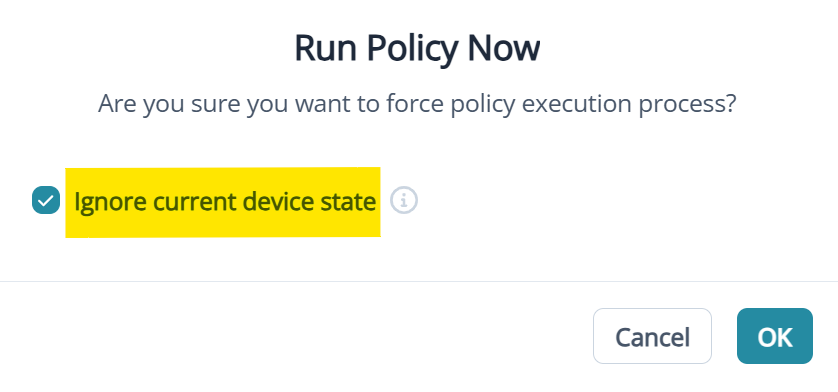
If for any reason you want to force a device to re-deploy apps already marked as compliant, you can use the below ‘run now’ policy option to force redeployment.
Florian Dushniku apologies, I provided some incorrect information to you previously. I have updated my comment above.
Thank you so much Toby. I appreciate you very much for taking the time to explain the feature in details.
Welcome Florian Dushniku ! Valuable discussion, I will also request that the details above are added to our KBs for clarity.
Please sign in to leave a comment.
Comments (13 comments)