
Update tooltip for "Enable for Cloud PCs" shown on "Desktop Image" window

Pretty much what it says on the tin.

We present the "Enable for Cloud PCs" option on the “Add Desktop Image” and/or “Set as an Image” windows in Nerdio, but typically this is greyed out:
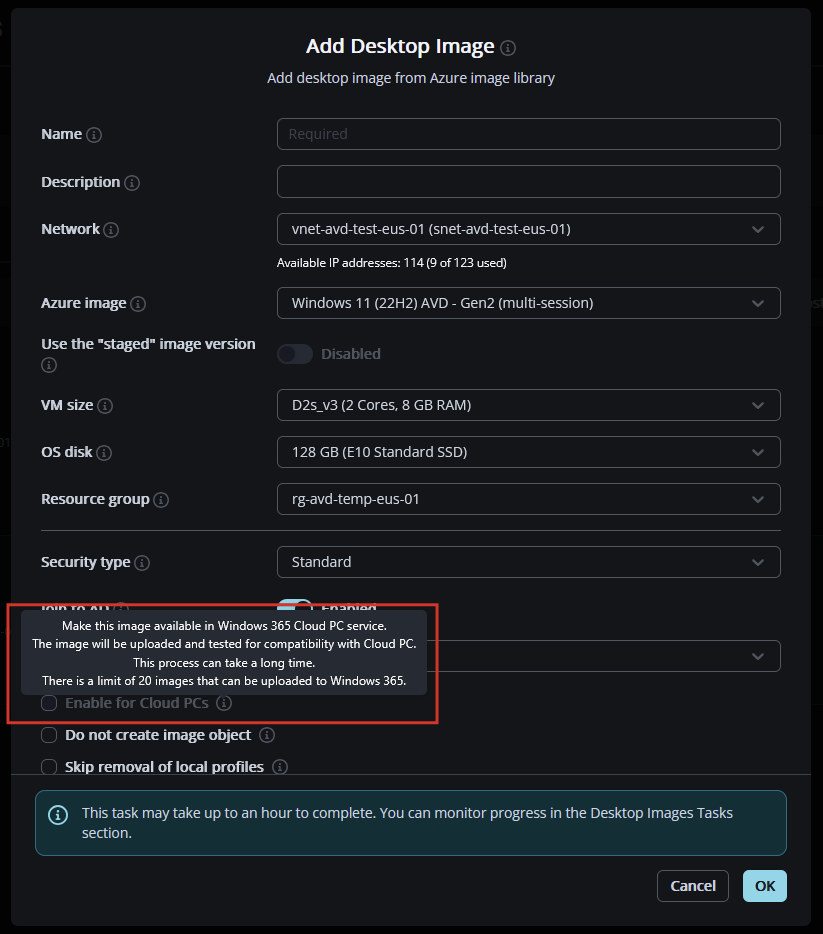
We don't really explain in the tool tip what the prerequisite is here to be able to enable this option, from working previous tickets in Support, it looks to be driven by the need to have an ACG and a Gen 2 image? 

Customers have raised tickets asking what it takes to allow the use of that option, so I think there is value in updating the tool tip to cover what is needed for the option to be ungreyed/usable, and maybe perhaps captured on relevant KB articles where applicable?

8

Comments (2 comments)

1
Avatar
Raul Morales

Hi Moose, thank you for raising this.
We have the below article with some details, but we will ensure we captured all the requirements and update the article as needed. We'll also include this article as a reference in the Desktop Images tooltip.

Windows 365: Use and Configure Desktop Images for Cloud PCs – Nerdio Manager for Enterprise

0
Avatar
Moose

Hey Raul Morales, thank you for the reply sir!

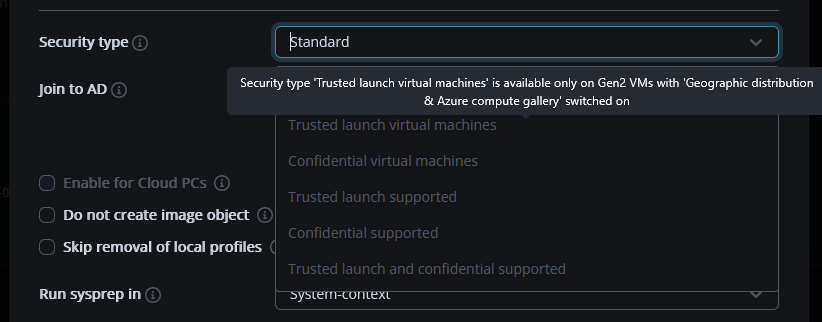
Whatever you think is the best approach, from experience, we have the same trouble with Security type, but customers usually don't realize that you can hover over the drop down options to see why an option is greyed out:

In this instance, they don't have that “easy feedback” in the Product to immediately know why it's unavailable, adding the article into the tool tip will be good, I worry customers may gloss past it in the KB article, but I suppose we can only do so much to lead people to the answer.

Thank you again for the acknowledgement!

Please sign in to leave a comment.