
In NME, the option to reimage an existing desktop image from the Azure Compute Gallery is available, but it’s buried so deeply that we initially assumed it wasn’t possible. It seems other users have encountered the same confusion (see Jason Lucas's post from Nov 8, 19:07, on reimaging desktop images from gallery versions). I only discovered it was possible after raising the question with Fabian.
The problem is that this option is hidden under both "Set-as-Image" and within the Schedule section, which is off by default—making it effectively invisible. First, it’s not immediately clear to users that this functionality is linked to "Set-as-Image." Although I can see the developer’s reasoning after reviewing the logs, finding this feature in the Schedule section is even less intuitive, as users may want to use it as a one-off task without needing to enable scheduling. Typically, enabling a schedule is done after testing, not beforehand.
To improve accessibility, I’d recommend moving the option outside the Schedule section under "Set-as-Image" and adding it as a top-level option in the Image drop-down menu, perhaps labeled "Refresh from Azure Marketplace" or something similar. This would be a quick win for Nerdio, as it’s a valuable feature that many users are simply unaware of.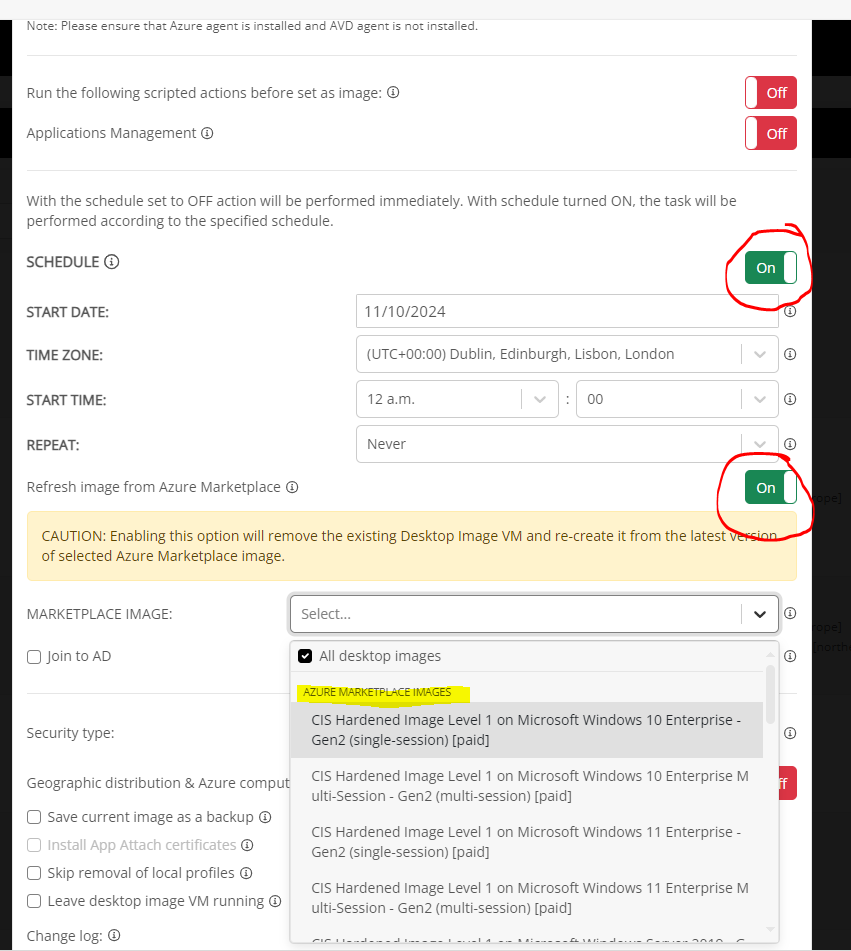


Comments (4 comments)